
The short answer
Google Analytics always had the answers. The hard part was knowing which report to open and what the numbers meant. With AI connected to Comal Inn's Google Analytics, I ask questions in plain English and get answers back with the numbers behind them. In a few conversations it found bot traffic inflating our numbers, a booking page we weren't measuring, and two guests who checked our site, then booked the same stays on Booking.com.
What changed
Google now offers a free connector that lets an AI tool read your Google Analytics account. Google calls it an MCP server. MCP is a standard way for AI tools to plug into other software. It's read-only. The AI can run reports, but it can't change a setting.
That changes three things for a small property:
- Speed. A question that used to take 20 minutes of clicking through reports takes one sentence. "Which visitors searched dates and didn't book?" gets an answer, not a menu.
- Reporting. It pulls several reports at once and lines them up: traffic by source, by country, by page, by hour.
- Clarity. This is the big one. It doesn't just hand back numbers. It cross-checks them and says when something doesn't add up.
Reading analytics used to be the job you meant to get to. Now it's a conversation.
What it caught
Here's what came up at Comal Inn, a 5-unit property in New Braunfels, Texas.
About 18% of our traffic was bots. Over 90 days, 416 “direct” visits came from Singapore and lasted about one second each, on top of a burst of fake referral traffic. They made our totals look bigger and threw off our percentages, enough that we corrected what we'd published about AI assistant traffic.
Our booking page wasn't being measured properly. Our booking engine runs on its own website, and Google Analytics wasn't set up to follow guests from our site to it. In 90 days it recorded one completed booking. The fix was a setting in Google Analytics, not new code. Here's the full fix.
“Paid search” showed up, and we don't run ads. The AI traced every one of those visits to Google Hotel Ads clicks that landed on our booking page. They're bookings we already pay commission on, labeled as ads because of how Google tags the link.
Most people who left the booking page wanted dates we didn't have. About 24 people searched Wurstfest dates. Roughly 20 wanted weekends that were already booked. Eight wanted the same Saturday. That isn't a website problem. It's demand we can capture next year.
Two bookings we lost to Booking.com
One afternoon two reservations came in on Booking.com, minutes after two visitors had been on our website. I asked what those visitors did, then checked what each guest paid.
Guest 1
4 nights · Thanksgiving
- 5 p.m.Arrives from a Google search, on a computer
- Searches Nov. 24–28, then Nov. 25–28
- Picks a room on our booking page
- Reaches the payment page, then leaves
- Minutes laterBooks Nov. 25–29 on Booking.com
- Our site
- $770
- Booking.com
- $616
- 20% Genius
- We kept
- $524
- after 15%
Guest 2
3 nights · early November
- 2 p.m.Arrives from a Google search, on a phone
- Searches Oct. 31–Nov. 1
- Sees rooms and prices, then leaves
- Minutes laterBooks Oct. 30–Nov. 2 on Booking.com
- Our site
- $490
- Booking.com
- $440
- 10% Genius
- We kept
- $374
- after 15%
What we built from this
About to leave? A 15% direct-booking code, shown once.
Back after checking dates? Their dates again, with 15% off.
Google Analytics doesn't record names, so we can't be certain these were the same people. But the timing and the dates line up for both. Booking.com was cheaper both times because of its Genius discount, which the property pays for.
If we had matched those discounts on our own site, we'd have kept about $428 and $598 after card fees. That's roughly $54 and $74 more, at the same price to the guest.
What we built
A discount for everyone would hand money to guests who book direct anyway. Our repeat guests come back for clean rooms, the location and an easy check-in, not a coupon. So we built two offers that only show up for visitors who look ready to book somewhere else:
- Someone who has been on the site a while, never clicked Book, and looks like they're leaving.
- Someone who already checked dates on our booking page and came back. They see their dates again, with 15% off.
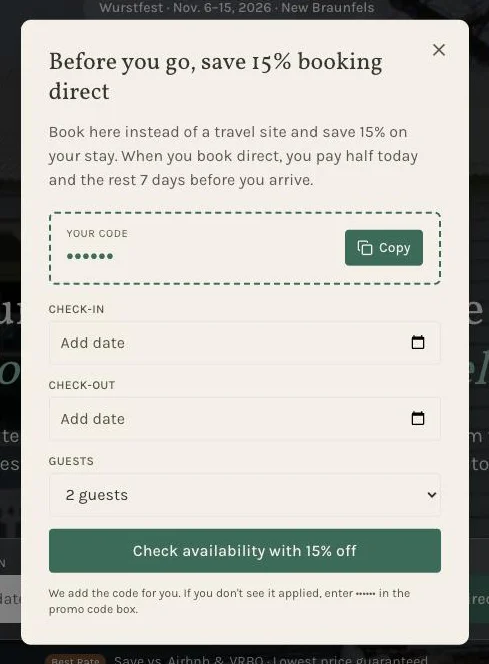
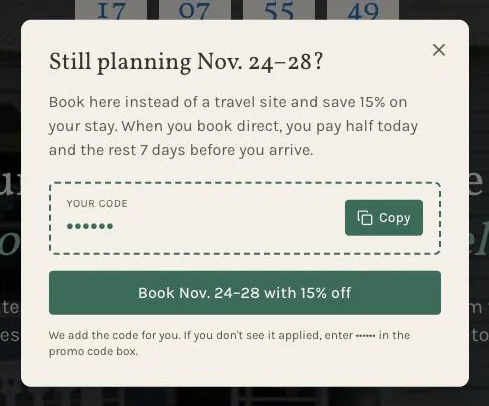
The second offer shows the guest their own dates again, so picking up where they left off takes one click. Both offers also say what booking direct means for the deposit: half today, the rest 7 days before arrival. (We've hidden the real codes in these screenshots.)
The code goes straight into the booking link, so the guest doesn't have to type it. Our booking engine reads it from the link and applies it, even if the guest picks dates after they get there.
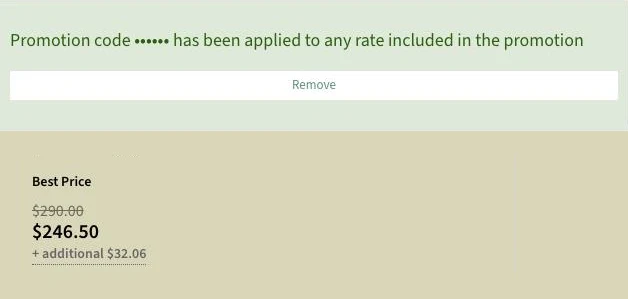
Each browser sees an offer once a month at most. It's too early to report results. I'll update this note when there are some.
Try it on your own numbers
You don't need AI to start. Open Google Analytics and check these four things:
- 01Look for bots.Add country and city to your traffic report. Thousands of one-second visits from places you never book from are not guests.
- 02Follow guests to your booking page.If your booking engine is on another website, make sure Google Analytics is set up to follow visitors there. Otherwise you can't see who booked.
- 03Find the searches that didn't book.If your booking engine sends dates to Google Analytics, look at which dates people searched. Sold-out dates explain a lot of drop-off.
- 04Compare your price to the OTA price.Search the same dates on your site and on Booking.com, logged in. If the OTA is cheaper, guests may notice before you do.
With AI connected, each of those becomes a question instead of an afternoon. The data was always there. Now it's easier than ever to understand it.
Quick answers
Can the AI change my Google Analytics settings?
Not with Google's connector. Google describes it as read-only. It can run reports, but it can't edit your settings, so every fix still gets made by you.
Do I need to be technical?
Asking questions takes no technical skill. Setting up the connector does: it takes a Google Cloud project and a few setup steps. Google links to setup instructions from its developer site.
Which AI tools work with it?
The connector uses MCP, a standard way for AI tools to plug into other software. We use Claude. Other AI tools that support MCP can use it too.
Does this replace Google Analytics?
No. It's the same data from the same account. The difference is you ask in plain English instead of hunting for the right report.
How do I spot bot traffic without AI?
In Google Analytics, open Reports, then Acquisition, then Traffic acquisition, and add country or city. Visits that last about one second, from data-center towns or countries you never book from, are usually bots.
Want me to look at your site?
Send me your website. I'll tell you what I'd fix first, for free.