
The short answer
Since May 2026, Google Analytics 4 puts visits from AI tools like ChatGPT in their own AI Assistant channel. At Comal Inn, AI assistants sent 350 visits from July 1 to September 28, 2026, nearly 1 in 10. Find yours under Reports, then Acquisition, then Traffic acquisition.
What we saw
For years, a visit from ChatGPT looked like any other referral in Google Analytics. In May 2026, Google started sorting those visits into their own channel. Once ours had a name, the numbers were hard to ignore.
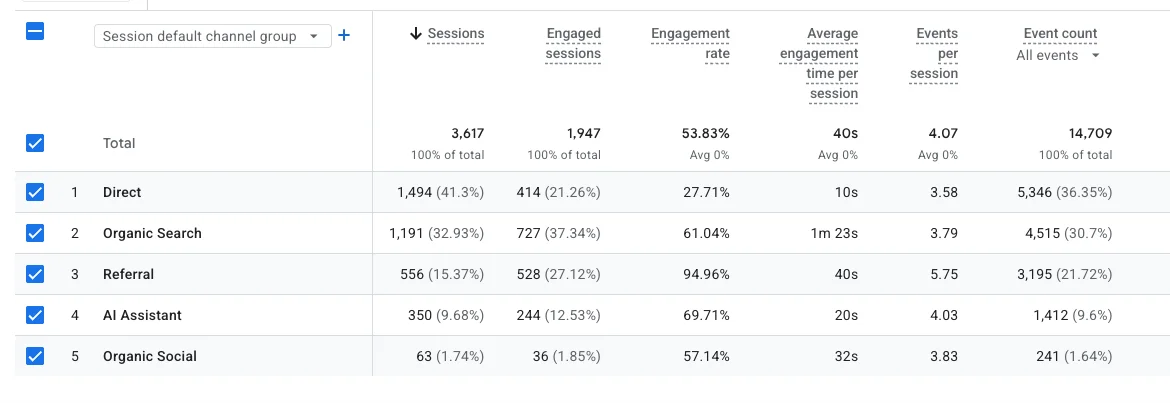
- AI assistants sent 350 sessions, 9.7% of all visits.
- That's more than five times what social media sent (63).
- 69.7% of AI visitors engaged with the site, compared with 53.8% across all visitors.
On paper, AI Assistant is our fourth-largest channel. But 501 of the 556 Referral sessions came from a single spam bot. Take those out and AI assistants are our third-largest source of visitors, behind only direct visits and Google search.
How to find yours
- 01Open Google Analytics 4.Go to Reports, then Acquisition, then Traffic acquisition.
- 02Look at the channel column.It shows your default channel groups: Direct, Organic Search, Referral and so on. Look for a row called AI Assistant.
- 03See which tools sent them.Switch the column from channel group to session source. You may see chatgpt.com, gemini.google.com and others.
- 04Pick the right dates.The channel only counts visits from mid-May 2026 forward. Older AI visits stay filed under Referral.
No AI Assistant row at all? That's useful too. It tells you where you're starting from.
What the channel misses
The number GA4 shows is a floor, not the full count.
- It isn't retroactive. Visits before mid-May 2026 stay in Referral or Direct.
- Some AI apps don't pass along where a visitor came from. Those visits land in Direct.
- Clicks from Google's AI Overviews and AI Mode count as Google search, not AI Assistant.
- Guests who hear about you from an AI tool and type your name into Google later show up as search or direct.
What we changed
None of this happened by luck. Before the channel existed, I started treating AI tools as a guest who reads every word but can't look at the photos.
- Rewrote each room, location and experience description so the facts were easy to pull out: what the room is, who it suits, what's nearby.
- Added an llms.txt file, a plain-text guide that tells AI tools what the property is and which pages matter.
- Cleaned up the structured data on the site so search engines and AI tools read the same facts.
- Made sure details like walking distances, fees and occupancy matched on the website and every listing.
Quick answers
Do I need to set anything up in GA4?
No. If Google Analytics 4 is already on your site, the AI Assistant channel shows up on its own in your traffic reports. There's nothing to install.
Why don't I see any AI traffic?
Three common reasons. The channel only counts visits from mid-May 2026 forward. Some AI apps don't pass along where the visitor came from, so those visits land in Direct. Or AI tools aren't recommending your property yet.
Does Google AI Overviews count as AI Assistant traffic?
No. Clicks from Google's AI Overviews and AI Mode come through Google search, so they show up as organic search, not as AI Assistant.
Can I get ChatGPT to recommend my property?
Nobody can guarantee it. You can remove the reasons it wouldn't: missing facts, details that don't match across your site and listings, and pages that are hard for software to read.
Want me to look at your site?
Send me your website. I'll tell you what I'd fix first, for free.