
The short answer
If guests book on your booking software's own page, Google Analytics needs two things to follow them there: your Analytics ID on the booking page, and both websites listed under cross-domain measurement. Without them, bookings look like they came from your own site, or don't show up at all. With them, Comal Inn's Analytics now shows each booking and the search, AI tool or ad it started from.
What breaks when booking happens somewhere else
Most small properties send guests to a booking page run by their booking software. At Comal Inn, a guest taps Book Direct on comalinn.com and books on eviivo's page at via.eviivo.com. To a guest, it's one trip. To Google Analytics, it's two different websites.
That causes three problems:
- Bookings don’t show up, because the booking page isn’t sending anything to your Analytics.
- Your booking page shows up as one of your top referrers, since guests who come back from it look like new visits sent by it.
- You can’t tell which search, ad or AI tool led to a booking, because the trail ends at your Book Now button.
What our numbers looked like
In the year before we fixed it, Google Analytics didn't record a single booking from our booking page. It did credit about 150 visits to via.eviivo.com as a referral. Those weren't new guests. They were our own guests coming back from the booking page.
We found it when we connected AI to our Google Analytics and asked where our bookings were coming from. This note is the full fix.
The fix: two settings
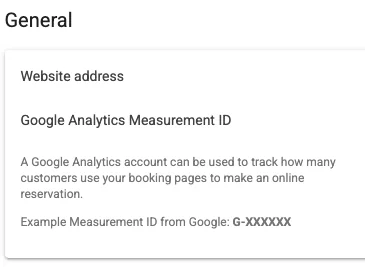
1. Put your Analytics ID on the booking page. In Google Analytics, find your Measurement ID under Admin, then Data streams. It starts with G-. Then paste it into your booking software. In eviivo it's a field called Google Analytics Measurement ID.
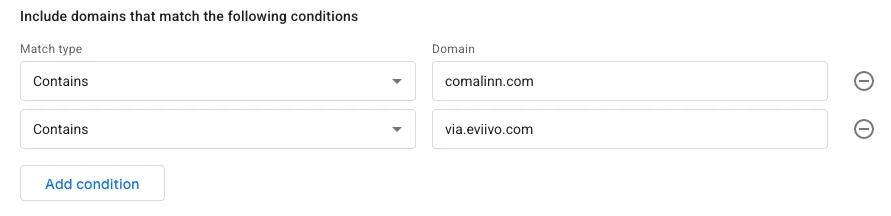
2. Tell Google Analytics both websites are yours. In Google Analytics, go to Admin, Data streams, pick your website, then Configure tag settings, then Configure your domains. Add your website and your booking page's domain. We added comalinn.com and via.eviivo.com.
That's it. No new code on our website. Google Analytics adds a short code to your Book Now links so the booking page knows it's the same visitor.
What we see now
In the first three weeks after both settings were in, the booking page reported every step, from viewing rooms to paying. And the visits credited to our own booking page as a referral dropped to zero.
- Tapped Book Direct on comalinn.com183
- Saw rooms on the booking page202
Some arrive straight from Google Hotel Ads, AI tools or a saved link
- Picked a room15
- Started checkout14
- Entered payment3
- Booked3
$154.59, $277.98 and $171.76
All three bookings started with a Google search, and all three amounts matched eviivo to the penny. We can also see who reached the booking page and from where:
- 86 people from Google search
- 63 who came straight to us, by typing our address or from a saved link
- 37 from AI tools like ChatGPT
- 12 from Google Hotel Ads, which Analytics labels as paid search
The drop between starting checkout and paying is where we'll look next. Fourteen people got that far, and three booked.
How to test yours
- 01Tap your own Book Now button.Look at the booking page address. If you see _gl= in it, Google Analytics is passing the visitor along. If your Book Now button is built with code instead of a plain link, check this carefully, since that part may not make it through.
- 02Watch Realtime.In Google Analytics, open Reports, then Realtime, and click through to your booking page. You should show up on both websites as one visitor.
- 03Check your referrals.In a week or two, open your traffic report. Your booking page shouldn’t show up as a referral anymore.
- 04Make a test booking.Book a cheap night, then cancel it. Check that the booking shows up in Analytics with the right source.
What it still misses
Google Analytics will always count less than your booking software. In those same three weeks, eviivo shows five bookings from our website. Analytics caught three of them. Some guests never show up in it:
- Guests with ad blockers or strict privacy settings, which can block Google Analytics altogether
- Guests who look on a phone and book later on a computer
- Bookings by phone or email
- Bookings on Booking.com, Expedia and other booking sites, which happen on their websites
Your booking software is the record of what booked. Google Analytics is for seeing where guests came from and where they stopped.
If you’re on other booking software
Ask whether your booking page accepts a Google Analytics Measurement ID or a Google Tag Manager code. Some document it. Staylist has a setting for a Google Tag Manager code and walks through cross-domain tracking, and RMS documents Google Tag Manager for its booking engine. Then list both domains in Google Analytics the same way.
If your booking engine runs right on your own pages, like some widgets do, you may not need any of this. Test it the same way to be sure.
Quick answers
What is cross-domain tracking?
A Google Analytics setting that follows one visitor from your website to a booking page on a different website, so their visit, and their booking, keep the source they started from.
Why does my booking engine show up as a referral in Google Analytics?
Because Analytics doesn’t know your booking page is part of your site. When a guest comes back from it, Analytics starts a new visit and credits the booking page. Listing both domains in cross-domain measurement fixes that.
Do I need a developer to set this up?
Not with booking software that has a Measurement ID or Google Tag Manager field. You paste your ID in your booking software and list both domains in Google Analytics. If your Book Now button is built with code, have someone test that the link carries through.
What is the _gl part in my booking link?
It’s how Google Analytics passes the visitor from your site to the booking page. If you see _gl= in the booking page address after tapping Book Now, the handoff is working.
Will Google Analytics match my booking software exactly?
No. In our first three weeks, it caught three of the five bookings our booking software shows from our website. Ad blockers, privacy settings, phone bookings and guests who switch devices all slip past it. Your booking software is the record of what booked. Analytics shows you where guests came from.
Want me to look at your site?
Send me your website. I'll tell you what I'd fix first, for free.