
The short answer
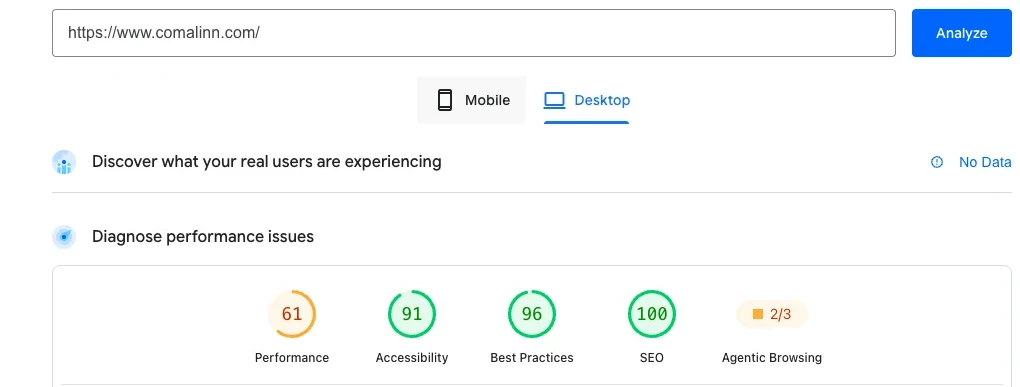
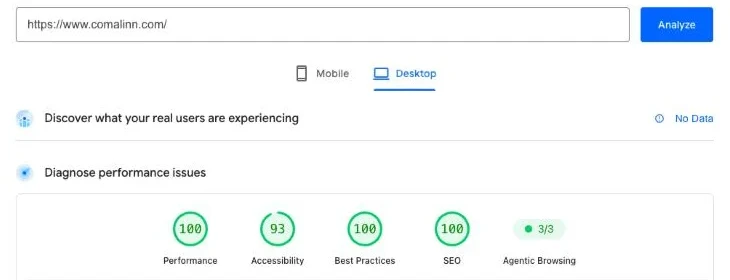
Guests judge your property by how your website feels on their phone. Comal Inn's desktop PageSpeed score went from 61 to 100 in a day by loading a chat widget, a slideshow and a social feed only when they were needed. On small property sites, the biggest slowdowns usually come from add-ons and oversized photos.
Why speed is hospitality
A slow website feels like a long line at check-in. The guest hasn't met you yet, and they're already waiting. Most of them are on a phone, often on a cell signal, often comparing you with three other tabs.
Google measures this too. Its Core Web Vitals look at how fast the main content shows up, how quickly the page responds to a tap, and whether things jump around while loading. Those are the same things a guest notices without knowing the names.
Round one: one blocking script
After I moved comalinn.com off WordPress, Google's PageSpeed test kept flagging one problem: the script for our texting widget was blocking the page while it loaded.
I reported it to TextMagic, and their team fixed it on their end within two weeks. The time the page spent frozen dropped from 2,580 milliseconds to 350, and the desktop score went from 46 to 93.
Round two: features piling up
Speed doesn't stay fixed. A few months later, the same homepage scored a 61 on desktop. Features had piled up, and too much of it was loading at once.
- The chat widget still loaded its full script the second the page opened.
- The homepage slideshow loaded every large photo up front.
- The Instagram feed loaded before anyone scrolled to it.
- Some photos were served much bigger than the screen needed.
None of those features had to go. They just had to wait their turn. After the fixes, the time the page spent frozen dropped from 2,710 milliseconds to under 150, and the live site scored a 100 on desktop.
Phones are harder. The mobile score is 67, and that's the next round of work.
Five fixes that matter most
- 01Load chat widgets late.Start them when a guest taps, scrolls, or after a few seconds. Guests rarely open chat in the first moment anyway.
- 02Load what's below the fold later.Social feeds, maps and review widgets can wait until a guest scrolls near them.
- 03Size photos for the screen.A phone doesn't need a photo straight off your camera. Serve smaller versions in a modern format like WebP.
- 04Show one great photo first.If your homepage has a slideshow, load the first slide right away and the rest after the page is ready.
- 05Retest every month.Run your homepage and your most-booked room page through PageSpeed Insights. Check after you add anything new.
Quick answers
What PageSpeed score should I aim for?
Green is 90 to 100. Desktop is the easier test to pass. Phones are tested on a slower simulated connection, so a mobile score in the 60s or 70s is common for small property sites. Aim to keep improving it.
Do I have to remove my chat widget or booking widget?
Usually not. Most of the gain comes from loading them at the right moment, like when a guest taps or scrolls, instead of the second the page opens.
How often should I check my speed?
Once a month, and after you add anything new to the site. Speed slips quietly as features pile up.
Is PageSpeed Insights free?
Yes. Go to pagespeed.web.dev, paste in your web address, and check both the Mobile and Desktop tabs.
Want me to look at your site?
Send me your website. I'll tell you what I'd fix first, for free.